

Google Business Profile Optimization Tips That Actually Help You Get Found
Most businesses claim their Google Business Profile. Far fewer actually optimize it.
If your goal is to show up when people search for your services locally, your Google Business Profile (GBP) is one of the most powerful—and most overlooked—marketing tools available.
The best part? It's completely free.
The difficult part? Simply filling it out isn't enough anymore.
Google wants to recommend businesses that appear active, trustworthy, and helpful. That means optimization isn't something you do once and forget—it's something you continually improve.
After helping businesses improve their online visibility, I've noticed that many owners think their profile is "finished" because every field has been completed. In reality, that's usually just the starting point.
Here are the optimization strategies that actually make a difference.
1. Complete Every Section—Even the Ones That Seem Optional
Google provides a surprising amount of information you can add to your profile.
Many businesses stop after entering: Business name, Address, Phone number, Website, Hours.
But there are many additional areas that help Google better understand your business.
Make sure you've completed:
Primary category
Secondary categories
Services
Products (when applicable)
Business description
Opening date
Accessibility information
Service areas
Attributes
Appointment links
Booking links
FAQs
Every piece of information gives Google more context about what your business does and who should see it.
Think of it this way: you're teaching Google exactly when your business should appear in search results.
2. Choose Your Categories Carefully
Your primary category carries a lot of weight. It tells Google what your business primarily does.
For example, if you're a chiropractor, selecting "Chiropractor" is much stronger than choosing something broad like "Medical Clinic."
Secondary categories help Google understand your additional services.
Don't add categories simply because they exist. Only choose categories that genuinely represent services you provide.
Too many unrelated categories can actually confuse Google's understanding of your business.
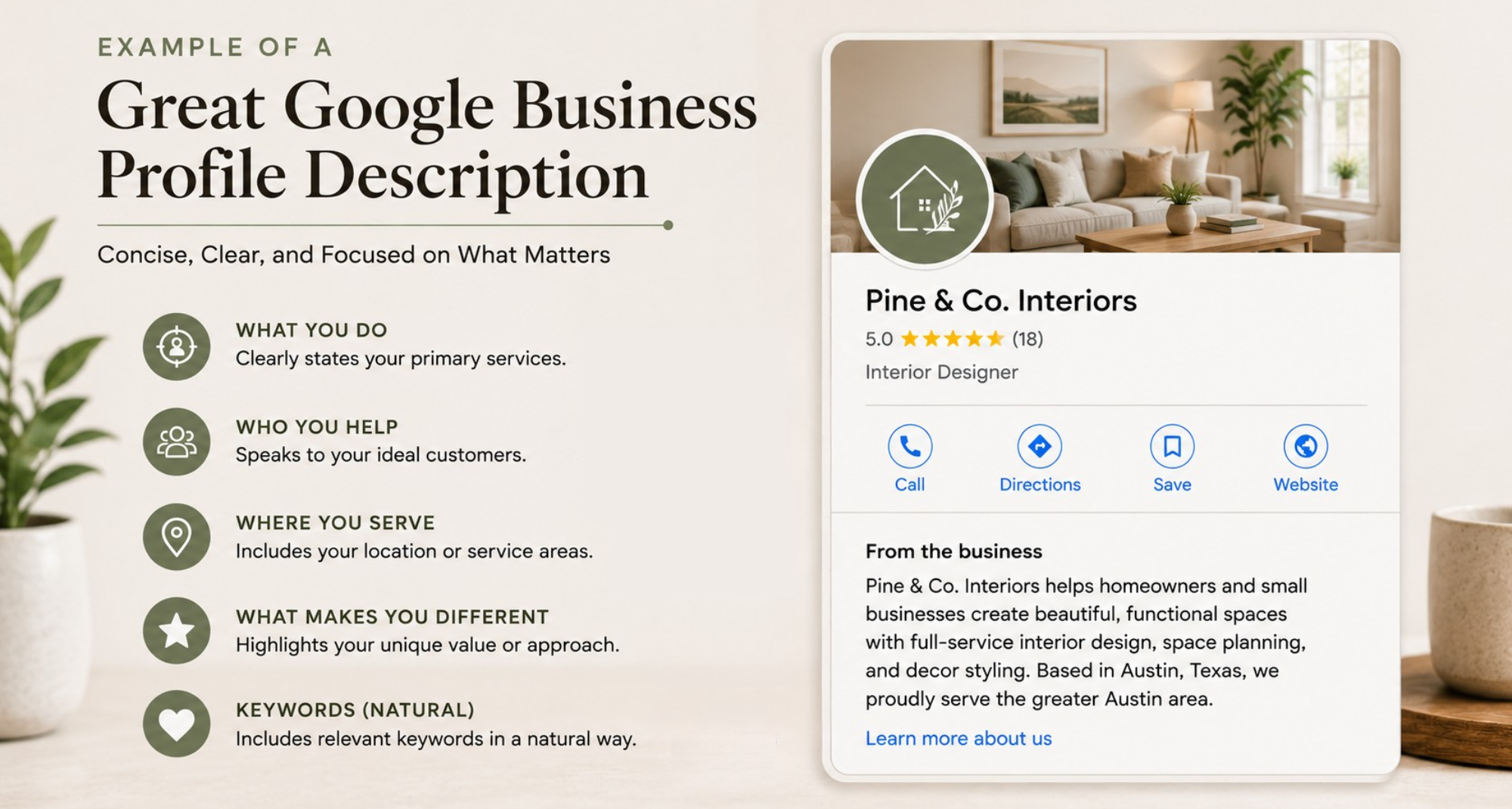
3. Your Business Description Isn't Just Marketing Copy
Many descriptions sound something like this:
We are the leading provider of quality services dedicated to customer satisfaction...
Unfortunately, that tells Google — and potential customers — almost nothing.
Instead, describe:
What you actually do
Who you help
Where you serve
What makes you different
Services you specialize in
Naturally include important keywords without stuffing them into every sentence.
Remember, you're writing for people first and Google's algorithm second.
4. Add Photos Regularly (Not Just Once)
One of the biggest misconceptions is that uploading ten photos during setup is enough.
Google likes active businesses. Fresh photos signal that your business is current and engaged.
Good photos include:
Your storefront
Team members
Projects
Before-and-after work
Equipment
Office space
Products
Vehicles
Events
Happy customers (with permission)
Even adding a few new photos each month can help keep your profile looking active.
Quality matters too. Bright, clear, well-composed photos create a stronger first impression than blurry snapshots.
5. Keep Posting Updates
Google Posts are like mini social media posts that appear directly on your Business Profile.
They're a great opportunity to showcase:
Promotions
New services
Seasonal specials
Blog articles
Company updates
Community involvement
Frequently asked questions
Helpful tips
Even if they don't directly improve rankings, they show potential customers that your business is active and engaged.
An outdated profile with no recent activity can quietly reduce trust before someone ever visits your website.
6. Reviews Matter More Than Just Your Star Rating
Most people focus on getting five-star reviews. That's important— but it's only part of the picture.
Google also pays attention to:
How often reviews come in
Whether they're recent
The quality of the written review
Keywords customers naturally mention
Whether you respond
A steady stream of authentic reviews is generally healthier than receiving twenty reviews in one week followed by six months of silence.
Encourage customers to describe their experience.
Instead of:
Great service!
Something like this provides much more value:
Corri redesigned our website, improved our Google Business Profile, and we've started getting more calls from local customers.
Those details help both future customers and Google's understanding of what your business does.
7. Respond to Every Review
Whether the review is positive or negative, always respond.
A thoughtful response shows:
professionalism
appreciation
customer service
business activity
It also adds more relevant content to your profile. When responding naturally mention services where appropriate, but avoid sounding robotic.
Compare these:
Not ideal:
"Thank you."
Much stronger:
"Thank you for trusting us with your website redesign. It was a pleasure helping your business improve its online presence, and we're excited to continue supporting your growth."
8. Fill Out Your Services Thoroughly
Many businesses only list two or three services. Take advantage of every relevant service you offer.
For each service:
Write a helpful description.
Explain who it's for.
Mention common problems it solves.
Include natural keywords where appropriate.
This gives Google additional information about what searches your business should appear for.
9. Answer Questions Before Customers Have to Ask
The Questions & Answers section is incredibly underused.
Instead of waiting for someone to ask:
Do you offer free estimates?
Do you serve nearby cities?
Do you work weekends?
What payment methods do you accept?
Add those questions yourself and answer them.
You're helping customers make decisions faster while also providing Google with more helpful information about your business.
10. Keep Your Information Consistent Everywhere
Google compares information across the internet.
If your business address, phone number, or business name differs between:
Your website
Google Business Profile
Facebook
Yelp
Bing
Local directories
…it creates conflicting signals.
This consistency is often referred to as NAP (Name, Address, and Phone Number) consistency, and it's an important part of local SEO.
Small inconsistencies can create unnecessary confusion for both customers and search engines.
11. Connect Your Google Business Profile to a Strong Website
Your Business Profile and your website work together.
A well-optimized profile can encourage someone to click through to your website, while a strong website reinforces the trust your profile has already established.
One supports the other.
If your website is outdated, slow, or missing important information, you're likely losing potential customers after they click.
That's why I always recommend viewing your website and Google Business Profile as one connected system— not two separate marketing tools.
12. Treat Your Google Business Profile Like a Living Asset
This is probably the biggest difference between businesses that stay visible and those that slowly disappear from local search.
Optimization isn't a one-time project. It's ongoing.
I recommend checking your profile at least once a month to:
Add new photos
Publish an update
Respond to reviews
Verify business information
Refresh services if needed
Answer new questions
Look for suggested edits from Google
Check insights to see how customers are finding you
Small, consistent improvements often outperform one big burst of activity followed by months of neglect.
Common Google Business Profile Mistakes to Avoid
Even well-intentioned business owners can accidentally hurt their visibility. Here are a few common mistakes I see:
Choosing categories that don't accurately match the business.
Stuffing keywords into the business name when they aren't part of the legal business name.
Letting outdated holiday hours remain on the profile.
Ignoring customer reviews or responding with one-word replies.
Uploading only stock photos instead of real images of the business.
Forgetting to update services as the business grows.
Assuming the profile is "done" after it's been set up.
Avoiding these mistakes can be just as valuable as adding new optimizations.
Final Thoughts
Your Google Business Profile is often the very first impression someone has of your business. Before they visit your website, call your office, or walk through your door, they're deciding whether you look trustworthy, active, and capable.
The businesses that consistently appear in local search results aren't always the biggest—they're often the ones that provide Google with the clearest, most complete, and most up-to-date information.
If you take the time to regularly improve your profile, respond to customers, showcase your work, and keep your information current, you'll be giving both Google and potential customers plenty of reasons to choose your business.
And if all of that feels like one more thing to squeeze into an already busy schedule, that's where I can help. At Corri Gidden LLC, I help businesses build a stronger online presence through Google Business Profile optimization, local SEO, website design, and digital marketing strategies that work together to attract the right customers—not just more traffic.